





Process mapping is the practice of visually documenting how work flows through a system, step by step, to reveal bottlenecks, redundant steps, and unclear handoffs. Process maps don't have to be complicated. They can range from a simple flowchart tracking a single task to a detailed diagram spanning multiple teams and organizational units. What makes a map useful isn't how complex it is, it’s whether it shows who does what, in what sequence, and where work stalls. Mapping should always precede any process improvement. If you're new to process mapping, you'll leave with a clear understanding of what it is, how to do it, and where teams most often go wrong. If you've mapped processes before, the section on current state vs. future state framing will help you get more out of the visualizations you're already building.
Here's what we'll cover:
- What process mapping actually is
- Why process mapping matters
- The main types of process maps
- How to create a process map, step by step
- A concrete workflow example
- How to move from current state to future state
- The most common process mapping mistakes
What is process mapping?
Process mapping is the practice of visually documenting the steps, sequence, owners, and decision points in a workflow. The goal is to create a shared, accurate picture of how work actually moves through a system, not how people think it moves or how leadership hopes it moves.
Who builds process maps?
Process maps are typically built by the people responsible for improving a workflow, such as scrum masters, operations leads, continuous improvement managers, or product owners. Critically, they should always involve the people who do the work. A process map built without input from the people doing the work reflects assumptions, not reality.
Why process mapping matters
Mapping a process doesn't fix it. That's an important distinction. Process mapping is an analysis tool, not a solution. Its purpose is to give you and your team an accurate picture of the current state before you propose any changes.
That picture does four specific things:
It reveals bottlenecks. Steps where work consistently stalls, queues build up, or capacity is exceeded become visible on a map in ways they don't in a status report.
It identifies redundant steps. Tasks that duplicate effort, steps that were necessary once but no longer serve a purpose, and approvals that exist out of habit rather than need are easy to miss in a status report, but they stand out clearly once the workflow is drawn end to end.
It clarifies ownership. Many processes have gaps at handoff points: steps that everyone assumes someone else owns. A process map makes those gaps explicit.
It creates a shared reference point. When teams discuss a process verbally, they often discover they have different mental models of how it works. A visual map aligns those models, which is a prerequisite for productive improvement conversations.
Without a current-state map, improvement suggestions are guesses. With one, they're targeted and defensible.
Types of process maps
Different workflows call for different mapping approaches. Here are the three most commonly used types:
| Type | Best for |
|---|---|
| Basic flowchart | Documenting a simple, linear workflow with few decision points or owners |
| Swimlane (cross-functional) map | Workflows involving multiple roles, teams, or departments where ownership clarity matters |
| Value stream map | End-to-end process analysis focused on identifying waste and measuring time at each step; common in lean and manufacturing contexts |
Choose a basic flowchart when you're mapping a contained, single-team workflow with straightforward sequence logic.
Choose a swimlane map when the workflow crosses team or department boundaries. Swimlane maps make ownership at each step explicit, which is where most cross-team processes break down.
Choose a value stream map when you're doing a deeper lean analysis and need to quantify time and waste across an entire value chain, from customer request to delivery.
For most agile teams, swimlane maps are the most practical starting point because they surface ownership gaps and handoff failures that simple flowcharts miss.
How to create a process map
You don't need expensive software to build a useful process map. A whiteboard, sticky notes, and the right people in the room are often enough. Here's a step-by-step approach:
- Choose the process to map
Pick a specific, bounded process. "How we deliver software" is too broad. "How a user story moves from backlog refinement to production deployment" is appropriately scoped. Start narrow, especially if this is your first time mapping. - List the steps and owners
Identify every action that takes place from the start of the process to its end. For each step, name the person or role responsible. Don't rely on memory alone. Talk to the people who do the work and ask them to describe it in their own words. You'll almost always learn something that surprises you. - Establish the sequence
Arrange the steps in order. Note which steps are sequential (one must finish before the next starts) and which can happen in parallel. Mark decision points where the process can branch in different directions. - Draw the map
Use a swimlane format if multiple roles are involved. Miro, Lucidchart, and Draw.io are all solid tools for this. If you're working in person, a whiteboard with sticky notes works just as well. - Review it with the team
Share the draft map with the people who do the work and ask: "Is this how it actually happens?" This step is non-negotiable. Discrepancies between the draft and what people describe reveal exactly where the map, and the process itself, needs attention.
Process mapping example: intake bottleneck
Here's a concrete example of process mapping applied to a common scenario.
The workflow: A development team's intake process, from a stakeholder submitting a request to the story being ready for planning.
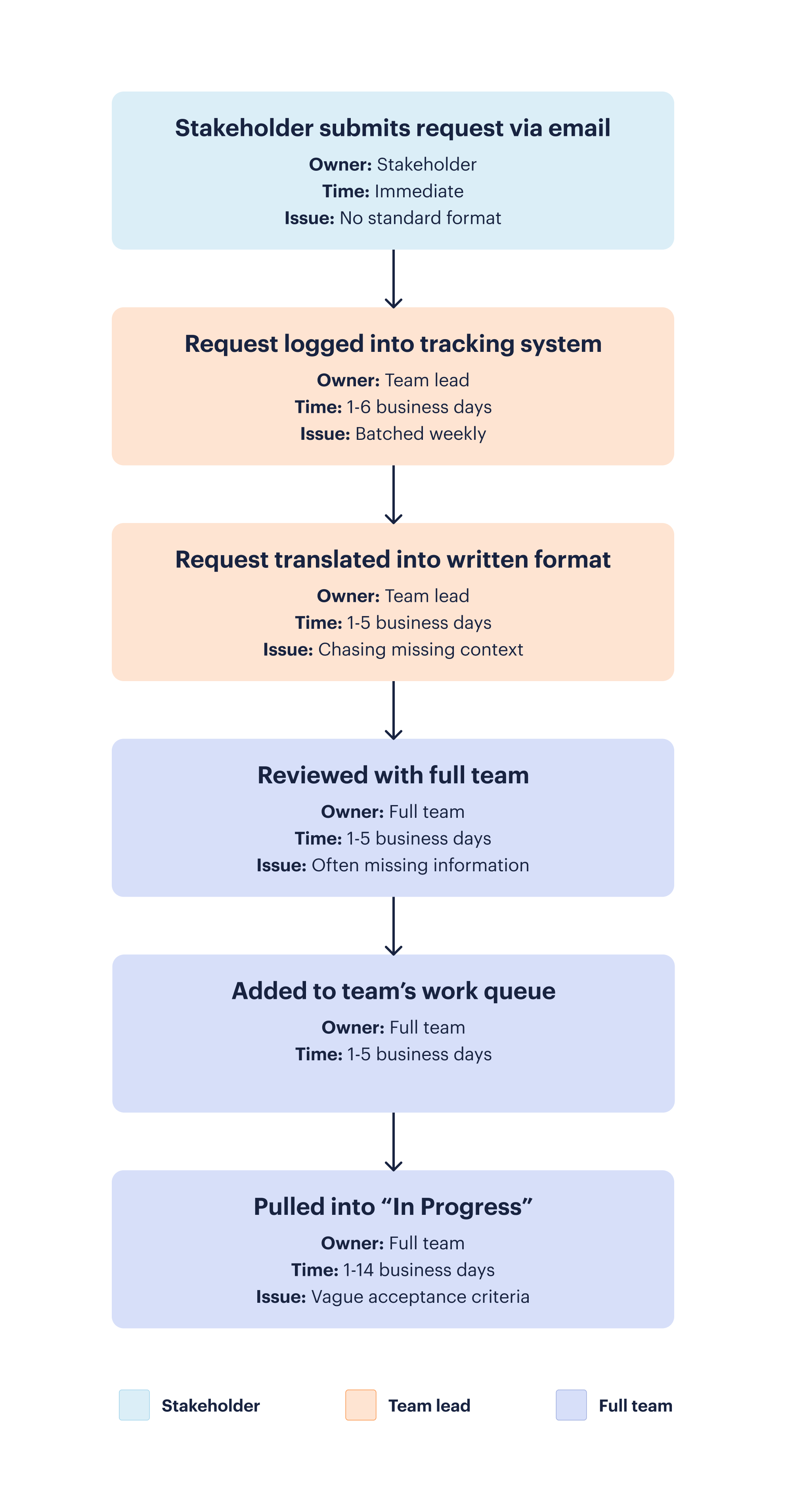
The map (current state):
- Stakeholder submits the request via email. This happens immediately, but without a standard format to follow.
- The team lead logs the request into the tracking system as part of a weekly batch upload. Since this only happens once a week, it can take 1–6 business days before a request is even reviewed.
- The team lead translates the request into a written format and spends time chasing down missing context. Depending on workload, this step can take 1–5 business days to gather context and prioritize the work.
- The work is reviewed with the full team, though it's often still missing information. Since the team only meets once a week to review upcoming items, this step can take 1–5 business days, and possibly longer depending on stakeholder availability.
- Once approved, the request is added to the team's work queue. Since planning happens only once a week, this step takes 1–5 business days.
- The team pulls the request into "In Progress" on their work board. Team often pulls in work items that are ready because of pressure to get the work done. Finishing it can take anywhere from 1–14 days, in part because work often ends up with vague or missing acceptance criteria, forcing the team to spend delivery time tracking down context that should have been captured upfront.
What the map reveals:
- Step two is manual and often creates a five-day lag, since the team lead processes requests in a weekly batch instead of as they come in.
- By the time work reaches step four, the stakeholder has already waited at least five days for an update, and the team still doesn't have enough information to start.
- The full process can take upwards of 35 business days to move a request from initial submission into the team's finished work queue.
The bottleneck: Work item preparation. The team lead is the single point of constraint, and the current intake method creates inconsistent input quality.
The future state opportunity: Introduce a standardized intake form that captures acceptance criteria at submission, automate the work board ticket creation, and add a lightweight pre-team review gate before work reach the team.
This map took less than 30 minutes to build and immediately surfaced a fixable bottleneck that had been slowing the team down for months. Mapping surfaces the problem; seeing how other teams solved similar ones is where process improvement examples come in handy for finding your own fix
From current state to future state
Mapping the current state is step one, but most teams want to skip straight to the future state. That's understandable. It's more exciting to design the improved version than to document what's broken.
Resist the temptation.
A future-state map built without a thorough current-state map is built on assumptions. It often solves the perceived problem rather than the real one. The current-state map is where you find out what's actually happening, and that foundation is what makes the future-state design credible.
Once you have an accurate current-state map, the future-state map becomes much more straightforward. You know exactly where the bottlenecks are, who owns the gaps, and which steps add no value. The future state is a targeted redesign, not a wishful reimagining.
A few principles for designing the future state:
- Challenge every step that exists "because we've always done it that way"
- Simplify handoffs before automating them; automating a broken handoff just makes it break faster
- Design for the common case, not the exception; edge cases can be handled separately
- Define what "done" looks like for each step before finalizing the map
Common process mapping mistakes
Mapping the ideal process instead of the actual one. The most common mistake. When people describe a process, they often describe how it should work. A good facilitator asks: "Is that what happens every time, or just when everything goes right?" Push for reality, not the aspiration.
Leaving out edge cases. Real processes have exceptions. A story that requires security review. A request that comes in from an enterprise client with a larger scope than normal. If those exceptions happen regularly, they belong on the map.
Building the map on your own. A process map built by one person reflects one person's perspective. Always validate with the team, especially with direct contributors. The gaps in your map are almost always in the steps you don't personally execute.
Using the map as a deliverable instead of a tool. A process map is an input to improvement, not an output. The goal isn't to have a beautiful diagram. The goal is to understand the workflow well enough to improve it.
See the process clearly, then fix it
Process mapping is where improvement starts. Every bottleneck that gets cleared, every handoff that gets simplified, every week that runs more smoothly, it all begins with a clear picture of how work actually flows.
The skills covered in this guide, including how to choose the right map type, facilitate a current-state mapping session, identify bottlenecks, and designing a credible future state, are skills that need to be practiced and honed until they are a natural way of working.
If you're ready to build those skills in a structured, hands-on way, Scrum Alliance's Process Improvement: From Analysis to Action microcredential is a three-hour, on-demand course that takes you from mapping through implementation and measurable results.
Frequently asked questions
What's the difference between a process map and a flowchart?
A flowchart is one specific, standardized format for showing a sequence of steps and decision points; it's been governed by a formal notation (ISO 5807) since the 1960s. A process map is the broader practice: visually documenting how work actually moves through a system, including who's responsible at each step and where handoffs happen. A flowchart is often the simplest way to build a process map, useful for a short, linear workflow with a single owner. More complex processes, especially ones spanning multiple people or teams, usually call for a swimlane or value stream map instead.
How do you create a process map step by step?
Start by choosing a specific, bounded process. Then list every step and its owner. Establish the sequence, including decision points and parallel steps. Draw the map using a tool like Miro or Lucidchart (or a whiteboard with sticky notes). Finally, review the draft with the people who actually do the work and refine it based on their input.
What are the main types of process maps?
The three most commonly used types are the basic flowchart (for simple, linear workflows), the swimlane map (for workflows involving multiple roles or teams), and the value stream map (for lean analysis focused on time and waste across an entire value chain).
Why is current-state mapping important before designing a future state?
A future-state process map built without a thorough current-state map is built on assumptions rather than facts. The current-state map reveals the actual bottlenecks, ownership gaps, and redundant steps so that the future-state design targets the real problems, not the perceived ones.
Who should be involved in building a process map?
Process maps should be built collaboratively with the people who do the work, not just team leads or managers. Contributors know where the process actually breaks down. Their input is essential for producing an accurate current-state map and for ensuring the team adopts any proposed future-state changes.
How does process mapping relate to agile and scrum?
Process mapping is directly applicable in agile environments. Scrum masters and product owners often use swimlane maps to visualize sprint intake, backlog refinement, and cross-team handoff workflows. Mapping is particularly useful for identifying the root cause of recurring sprint planning problems or delivery delays.